
Disclosure: WorkWise is reader-supported. When you buy through links on our site, we may earn an affiliate commission at no extra cost to you. Learn more.
At-a-glance recommendations
Start with these highlighted picks, then read the full guide below for the complete breakdown.
1. Anti-fatigue mat
If you stand even half the day, this is mandatory. See the standing desk guide .
2. Wrist rest (memory foam)
A cheap memory-foam wrist rest in front of your keyboard prevents that "bent wrist resting on the desk edge" position that quietly causes RSI.
3. Lumbar support cushion
If you can't justify a new chair yet, a $25 lumbar cushion can transform an existing chair. Look for memory foam, not gel.
4. USB-C hub
If you have a modern laptop with only USB-C, a powered hub with HDMI, USB-A, SD reader and Ethernet is non-negotiable. Anker and Satechi both make…
5. A real webcam
The Logitech C920 is over a decade old and still better than most laptop cameras. Or step up to the Brio for 4K.
6. A real microphone
People will forgive a so-so video. They will not forgive bad audio. A budget USB mic like the FIFINE K669 or stepping up to the Shure MV7 makes you…
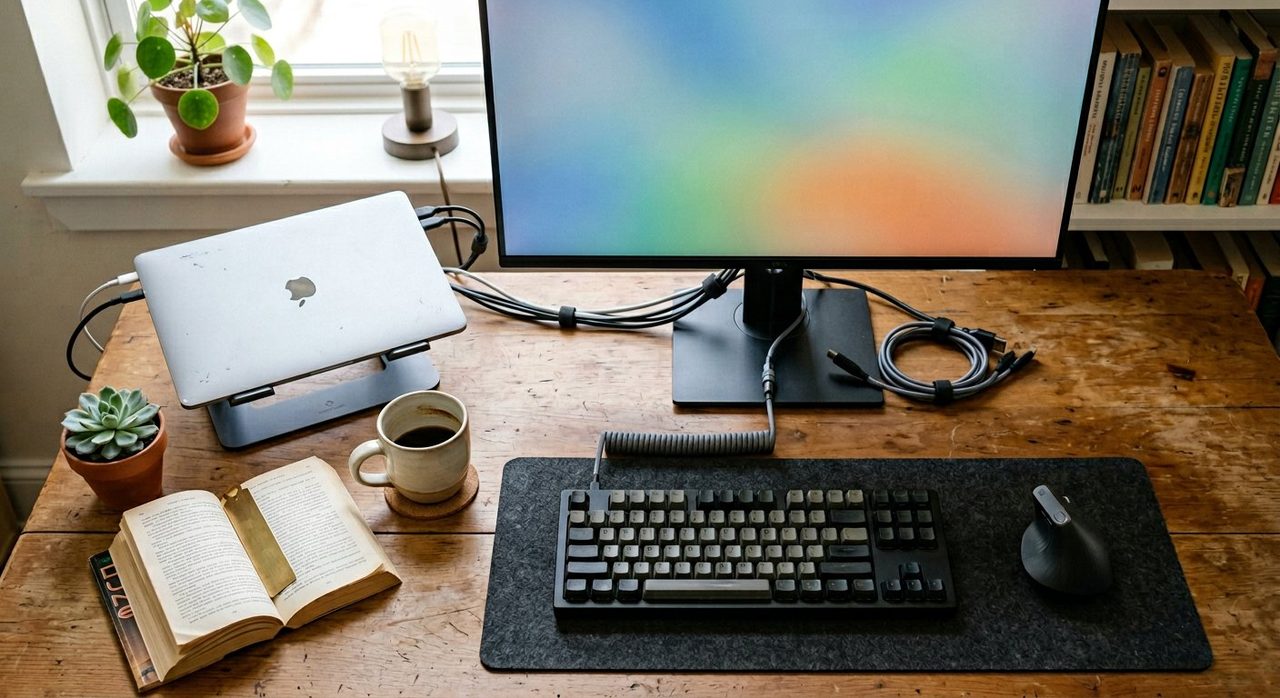
My desk as I write this — most of the items below have been on it for years.
The big stuff — chair, desk, monitor — gets all the attention. But after years of working from home, it's the small, cheap, unglamorous purchases that I'd grab first in a fire. Here are 15 work-from-home essentials I use every day, almost all under $50.
Desk & comfort
1. Anti-fatigue mat
If you stand even half the day, this is mandatory. See the standing desk guide.
Price, availability, ratings and review counts can change — check Amazon for the latest details.
2. Wrist rest (memory foam)
A cheap memory-foam wrist rest in front of your keyboard prevents that "bent wrist resting on the desk edge" position that quietly causes RSI.
Price, availability, ratings and review counts can change — check Amazon for the latest details.
3. Lumbar support cushion
If you can't justify a new chair yet, a $25 lumbar cushion can transform an existing chair. Look for memory foam, not gel.
Price, availability, ratings and review counts can change — check Amazon for the latest details.
Tech essentials
4. USB-C hub
If you have a modern laptop with only USB-C, a powered hub with HDMI, USB-A, SD reader and Ethernet is non-negotiable. Anker and Satechi both make good ones.
Price, availability, ratings and review counts can change — check Amazon for the latest details.
5. A real webcam
The Logitech C920 is over a decade old and still better than most laptop cameras. Or step up to the Brio for 4K.
Price, availability, ratings and review counts can change — check Amazon for the latest details.
6. A real microphone
People will forgive a so-so video. They will not forgive bad audio. A budget USB mic like the FIFINE K669 or stepping up to the Shure MV7 makes you sound like you care.
Price, availability, ratings and review counts can change — check Amazon for the latest details.
7. Mechanical keyboard (quiet switches)
Typing 5+ hours a day on a laptop keyboard is rough. A low-profile mechanical with brown or red switches is comfortable and quiet enough for video calls.
Price, availability, ratings and review counts can change — check Amazon for the latest details.
8. Vertical or trackball mouse
A vertical mouse (Logitech MX Vertical) or trackball (MX Ergo) takes a week to adapt to and then your wrist will thank you forever.
Price, availability, ratings and review counts can change — check Amazon for the latest details.
Quality of life
9. Noise-cancelling headphones
Even if you live alone, the act of putting them on is a "focus mode on" cue your brain learns. Sony WH-1000XM5 or Apple AirPods Max for the high end; the Soundcore Space Q45 for half the price.
Price, availability, ratings and review counts can change — check Amazon for the latest details.
10. Blue-light glasses (only if you need them)
The research on blue light blocking is mixed, but if you get headaches by evening they're cheap to try. Felix Gray is the design-conscious option.
Price, availability, ratings and review counts can change — check Amazon for the latest details.
11. A real water bottle on your desk
Sounds trivial. Isn't. A 32oz insulated bottle within arm's reach means you actually drink water and you have an excuse to stand up to refill it. A Hydro Flask or Owala FreeSip lives on my desk.
Price, availability, ratings and review counts can change — check Amazon for the latest details.
12. Desk plant
One small piece of green in your peripheral vision genuinely reduces visual fatigue and makes the space feel less sterile. A pothos or ZZ plant survives almost anything.
Price, availability, ratings and review counts can change — check Amazon for the latest details.
Organisation
13. Cable raceway + Velcro ties
Cheap, ugly to install, life-changing once done. You stop seeing cables and start seeing your desk.
Price, availability, ratings and review counts can change — check Amazon for the latest details.
14. A pocket notebook (analog!)
For the random "I need to remember this" thought that doesn't belong in a digital task system. A Field Notes or Moleskine pocket book + a Uni-ball Jetstream pen. Yes, even in 2026.
Price, availability, ratings and review counts can change — check Amazon for the latest details.
15. A real desk lamp
See the full lighting guide. The BenQ ScreenBar Halo is the upgrade I recommend most often.
Price, availability, ratings and review counts can change — check Amazon for the latest details.
What I'd skip
- Treadmill desks. Great in theory; almost no one uses them past month two.
- "Productivity planners" with elaborate systems. A simple notebook does the same job.
- RGB everything. Looks fun for a week; then it's a circus.
- Smart desks with iOS apps. You will never use the app.
Final word
You don't need to buy these all at once. Pick the one whose absence bothers you most right now, get a good version of it, and live with it for a month before buying the next. That's how an office becomes a place you want to work, instead of a pile of gadgets.
Frequently asked questions
What's the single most important work-from-home purchase?
If you don't have one already, a real ergonomic chair. After that, a decent monitor + monitor arm. These two solve the biggest physical problems of laptop-based remote work.
Do I need a docking station to work from home?
If your laptop has USB-C and you're switching between desk and travel often, yes — a single-cable dock saves real time daily. If you're permanently set up, individual cables work fine.
Are noise-cancelling headphones worth it for working from home?
Yes — especially if anyone else is in your home. Beyond noise blocking, the act of putting them on becomes a 'focus mode' cue for you and a 'don't interrupt' signal for everyone else.
Should I buy a desk lamp if my room has overhead lighting?
Yes. Overhead lighting alone causes glare on screens and shadows under your face on video calls. A good desk lamp (or screen-bar light) fixes both.
Spotted a mistake or want to suggest a product we should test? Get in touch — we read every message.