
Disclosure: WorkWise is reader-supported. When you buy through links on our site, we may earn an affiliate commission at no extra cost to you. Learn more.
I resisted the Pomodoro Technique for years. The idea of breaking my day into rigid 25-minute slices felt like the opposite of how I actually focus. Then I tried it during a brutal deadline, modified it a bit, and now it's the single biggest reason I get serious work done. Here's how I use it — and how you can adapt it so it doesn't feel like a productivity straitjacket.
The classic Pomodoro, briefly
Francesco Cirillo's original technique:
- Pick a task.
- Set a timer for 25 minutes.
- Work on the task. No distractions. No tab-switching.
- When the timer rings, take a 5-minute break.
- Every 4 pomodoros, take a longer 15–30 minute break.
Why it works (when it works)
- It defeats Parkinson's Law. Work expands to fill the time you give it; a 25-minute box forces decisions.
- It makes starting easier. "Work on the report" is intimidating; "Work on the report for 25 minutes" isn't.
- It externalises focus. The timer, not your willpower, polices distraction.
- It builds in recovery. Most knowledge work fails because we never let attention recharge.
Why it sometimes fails
The 25-minute interval is too short for deep work. The moment I get into flow on a difficult problem, the timer goes off and shatters it. The classic technique also doesn't differentiate between admin tasks (which benefit from short bursts) and creative work (which needs long uninterrupted blocks).
My modified Pomodoro
- Sort tasks into two buckets each morning: shallow (email, admin, code review) and deep (writing, design, architecture).
- Shallow work: classic 25/5 timer.
- Deep work: 50/10 timer. Two "deep pomodoros" before lunch, two after.
- Honour finish-the-thought rule: if the timer rings mid-sentence, finish the sentence. Don't kill flow for dogma.
- Track only what got done, not how many pomodoros. The count is a cue, not a score.
Apps and timers I've tried
TickTick Premium
Has a built-in Pomodoro timer that ties pomodoros to specific tasks. Cross-platform, syncs with calendar. The setup I use day-to-day.
Check on TickTickForest App
You "plant a tree" that grows over the focus interval; switch apps and the tree dies. Sounds gimmicky; works absurdly well for phone-distraction.
Check on ForestTime Timer Plus 60-Minute
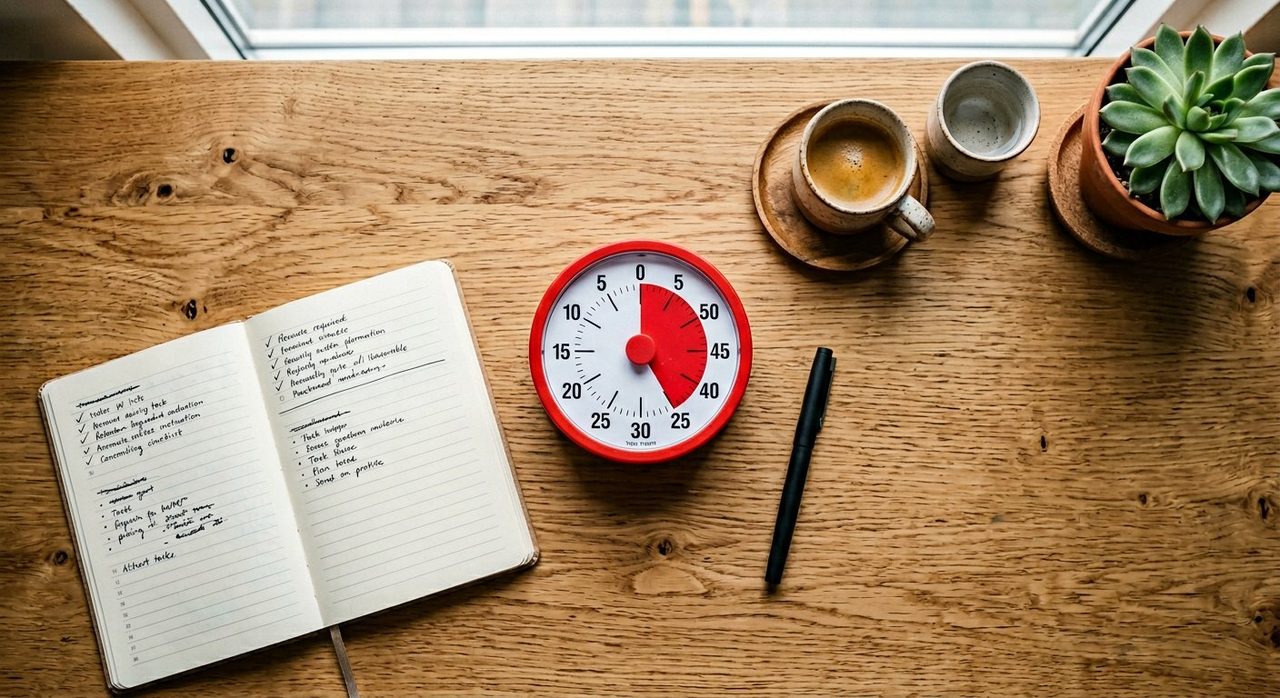
A physical visual timer. No phone. No notifications. Just a red disk that shrinks. Surprisingly more effective than any app for deep work.
Check price on AmazonHow to make Pomodoro stick
- Plan the night before. Pick your three tasks for tomorrow before you close your laptop today.
- Defend the break. Stand up, look out the window, get water. Do not switch to social media — your brain doesn't rest in a feed.
- Pair with calendar blocking. Block 2–3 "deep work" slots in your calendar each day; protect them like meetings.
- Track distractions on a sticky note. When your brain says "I should check Slack," write it down and stay in the pomodoro. You'll find most of those urges weren't urgent.
A realistic daily template
| Time | Block |
|---|---|
| 9:00–9:20 | Plan the day; quick inbox triage (25/5) |
| 9:30–11:30 | Deep work (2 × 50/10) |
| 11:30–12:30 | Meetings / collaboration |
| Lunch + walk | Real break, away from desk |
| 14:00–16:00 | Deep work (2 × 50/10) |
| 16:00–17:00 | Admin, shallow tasks (2 × 25/5) |
Wrap up
If Pomodoro hasn't worked for you in the past, try the 50/10 variant for deep work, pair it with a physical timer, and let yourself finish thoughts. Within a week you'll notice you finish more in the morning than you used to finish all day.
Frequently asked questions
Is 25 minutes too short for deep work?
Often, yes. The classic 25/5 Pomodoro is great for shallow tasks (email, admin) but interrupts the flow of demanding creative or technical work. For deep work, a 50/10 or 90/15 cycle works much better.
Do I need a special app for Pomodoro?
No. A physical visual timer (Time Timer) outperforms most apps — no notifications, no temptation to switch apps, just a shrinking red disk. If you want an app, TickTick and Forest are both excellent.
What should I do during a Pomodoro break?
Stand up, look at something more than 20 feet away, walk, get water. The one thing you should NOT do is open a feed, news, or email — those aren't breaks, they're context switches.
Should I track how many Pomodoros I do per day?
Most people give up tracking after a week. Better to focus on what you accomplished, not how many timer cycles you ran. The technique is a focus cue, not a productivity score.
Spotted a mistake or want to suggest a product we should test? Get in touch — we read every message.