
Disclosure: WorkWise is reader-supported. When you buy through links on our site, we may earn an affiliate commission at no extra cost to you. Learn more.
At-a-glance recommendations
A fast comparison list for the products covered in this guide.
Rain Design mStand
A solid block of curved aluminium that's been the gold-standard laptop stand for over a decade. No moving parts means nothing to break. Cable routing…
Nulaxy Adjustable Laptop Stand
Under $40. Multiple height settings, rock-solid at any of them, takes laptops up to 17". The default recommendation for anyone whose ideal screen…
Roost Laptop Stand
Folds down to the size of an umbrella, weighs 6 oz, and pops up to a proper eye-level height. The pick for hybrid workers who bring their laptop…
Boyata Laptop Stand
Lifts a laptop high enough to use as a standing-desk substitute on a regular desk. Heavy, stable, and the joints lock firmly. A genuine alternative…
Twelve South BookArc
Stands a closed laptop on its edge, freeing desk space when you're using an external monitor. Especially good for MacBooks in clamshell mode. See our…
If you work from a laptop, the single cheapest neck-saving purchase you can make is a laptop stand. We're talking $30–$80 to permanently end the daily neck ache that comes from staring 12 inches below your eye line for 8 hours. Here are the laptop stands that we actually recommend, organized by use case.
Why your laptop's built-in height is wrong
A laptop is, by design, a compromise. The same hinge that makes it portable forces a fixed relationship between the screen and the keyboard — meaning either your hands are in the right place and your eyes are looking down, or your eyes are in the right place and your hands are reaching up. Both are bad.
A laptop stand decouples these two surfaces. Lift the screen to eye level, plug in an external keyboard and mouse, and suddenly your body is in the right position. Neck pain you've been blaming on "stress" or "sleeping wrong" disappears in days.
What to look for in a laptop stand
- Height range that hits eye level. Most adults need the laptop screen lifted 4–8 inches. Check your seated eye-line first.
- Stability under typing pressure. A wobbly stand is worse than no stand.
- Heat dissipation. Aluminium and well-ventilated designs let your laptop run cooler — important if you're on Zoom for hours.
- Cable routing. A small notch or channel for the charger cable is a small thing that matters daily.
- Portability (if relevant). Foldable stands are great for hybrid workers who travel.
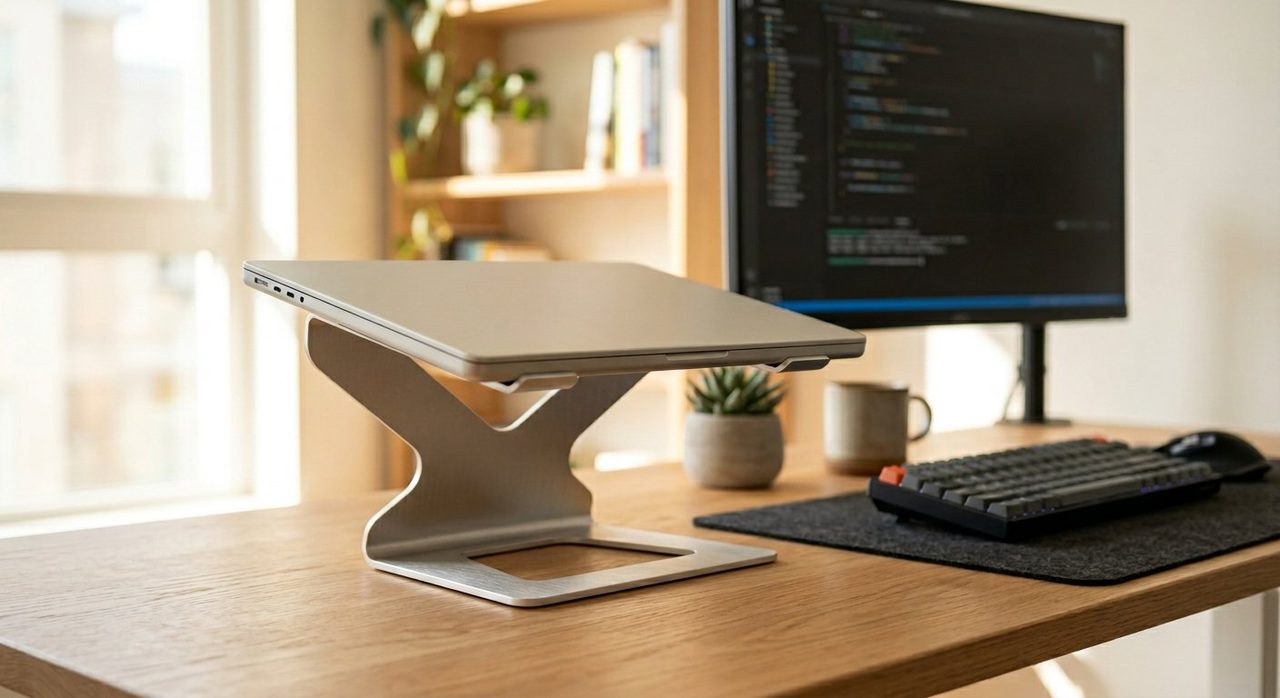
1. Best overall — Rain Design mStand
Rain Design mStand
A solid block of curved aluminium that's been the gold-standard laptop stand for over a decade. No moving parts means nothing to break. Cable routing slot at the back. Heat dissipates straight through the aluminium body so your fans run quieter. The non-adjustable height (5.9") works for most users.
2. Best adjustable — Nulaxy Adjustable Laptop Stand
Nulaxy Adjustable Laptop Stand
Under $40. Multiple height settings, rock-solid at any of them, takes laptops up to 17". The default recommendation for anyone whose ideal screen height is different from "the standard."
3. Best portable — Roost Laptop Stand
Roost Laptop Stand
Folds down to the size of an umbrella, weighs 6 oz, and pops up to a proper eye-level height. The pick for hybrid workers who bring their laptop between home and office.
4. Best sit-stand laptop stand — Boyata Laptop Stand
Boyata Laptop Stand
Lifts a laptop high enough to use as a standing-desk substitute on a regular desk. Heavy, stable, and the joints lock firmly. A genuine alternative to a $400 standing desk if you're not ready to commit.
5. Best vertical stand (for closed-lid use)
Twelve South BookArc
Stands a closed laptop on its edge, freeing desk space when you're using an external monitor. Especially good for MacBooks in clamshell mode. See our small-space office guide for context.
Pair it with the right accessories
A stand alone is half a setup. To get the full ergonomic benefit:
- External keyboard — see our keyboard guide.
- External mouse — preferably ergonomic. Vertical mice work especially well with laptop-stand setups.
- USB-C hub — one cable from the stand handles power, peripherals, and a monitor.
Final word
The Rain Design mStand is the buy-once stand for most people. If you need height adjustability, get the Nulaxy. If you travel, get the Roost. None of these are expensive; all of them solve a real ergonomic problem that costs you neck pain and productivity every day you don't fix it.
Frequently asked questions
Do I really need a laptop stand?
If you work on a laptop for more than 2 hours a day at a desk, yes. Without one your screen sits 8–12 inches below eye level, forcing your neck into a sustained downward bend that causes upper-back and neck pain within weeks. A $30 stand fixes this permanently.
Will a laptop stand make typing harder?
Yes — and that's the point. You're meant to pair it with an external keyboard and mouse. The stand lifts the screen to eye level; the external peripherals keep your hands in the right typing position.
What's the best height to set a laptop stand at?
The top edge of the screen should be at or just below your eye line when you're sitting up straight. Most stands have multiple height settings; pick the one closest to that without straining.
Are bamboo or aluminium stands better?
Aluminium dissipates heat better — important for laptops that run hot under load. Bamboo looks warmer and works fine for casual use. For all-day work, choose aluminium.
Can a laptop stand replace a monitor?
Not really. A stand fixes posture but you still have a small screen. For 6+ hours of daily work, add an external monitor (see our monitor guide). A stand + external keyboard + monitor is the sweet spot.
Spotted a mistake or want to suggest a product we should test? Get in touch — we read every message.